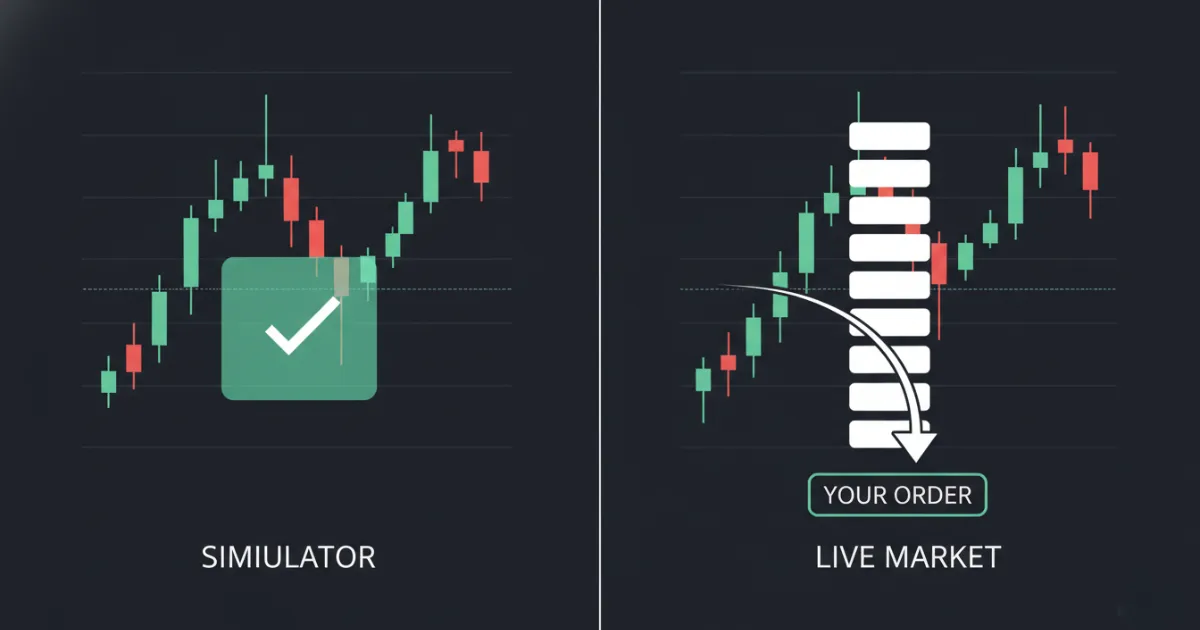
Your paper trading account shows a $4,500 profit for the day, but when you switch to live trading, that same setup drains $600 of your real savings.
Simulators build your confidence. Your orders fill at the price you asked for, session after session, which is not how a live order book behaves. Sometimes you build too much of it.
Key Takeaways
- Simulated order-matching engines fill orders at top-of-book quotes the moment price touches them, with no account for queue priority or market impact.
- Retail trading simulators gamify the experience with leaderboards and cash-prize contests, which pushes users toward overtrading instead of professional discipline.
- Deliberate practice requires breaking trading into isolated sub-tasks with immediate feedback after each repetition.
- Transitioning to live markets requires manual adjustments for transaction friction, starting with a reset of the default simulator balance to match your real starting capital.
I came to trading from an IT career at Airbus Defence & Space. That background is why I read a simulator the way I read a system. I see the matching engine behind the chart.
Most paper trading platforms are marketing funnels built by brokers. They are designed to feel smooth, encouraging, and easy.
To survive the transition to live markets, you must understand the math and mechanics behind the screen.
How a Simulated Matching Engine Fills Your Order
Your order stays on your computer. The platform reads the public market data feed, compares your limit price against the last print, and writes a fill into a local database. No order reaches the NYSE or NASDAQ, and no liquidity changes hands.
The same holds whether you open a desktop platform or a browser-based simulator that streams live candles. Only the interface changes.
The Difference Between Paper Trading and Live Execution
Paper trading is a closed-loop system. When you place an order in a live environment, your brokerage routes that order to a market maker, an exchange, or an alternative trading system. Your trade must compete with thousands of other institutional and retail orders for execution.
In a simulator, none of this competition exists. The software assumes infinite liquidity is available at the prevailing bid or ask price. If the public tape prints a single share traded at $105.50, the simulator fills your virtual 5,000-share buy limit order at $105.50.
In the real world, you might only get filled on 100 shares before the price moves away, leaving you with a partial fill or a missed move.
Why Regulators Warn Against Simulator Gamification and Financial Fraud
The Financial Industry Regulatory Authority (FINRA) (2022) issued warnings regarding how digital investment platforms use gamification features like leaderboards, virtual badges, and trading contests. These mechanics leverage paper trading to engage retail users. The psychological result is a heightened tendency toward excessive trading and risk-seeking behavior. You are trained to treat the market like a casino before you ever risk a dollar.
Worse, simulated environments can be used to hide outright theft. The U.S. Securities and Exchange Commission (SEC) (2016) prosecuted the operators of an unregistered broker-dealer named Nonko Trading. The firm took $1.4 million from retail clients under the pretense of live trading.
Instead of routing orders to the market, the operators placed clients on simulated accounts and pocketed the deposits. The clients believed they were losing money to bad trades. They were trading against a database.
Understanding the limits of these databases prevents you from falling for their illusions.
Why Simulator Fills Are Too Generous
Simulated matching engines fill your order at the top-of-book bid or ask the moment price touches it, ignoring queue priority and market friction. The engine assumes your trade moves nothing.
When you build software, you write logic to handle the most common path. For a simulator, the easiest path is to check if the current market price matches your limit price. If it matches, the database executes the fill. This simple logic leaves out the mechanics of matching engines.
Top-of-Book Execution vs. Order Queue Priority
Live exchanges use a first-in, first-out (FIFO) matching queue. If there are 50,000 shares offered at $50.00, and you submit a limit buy order for 1,000 shares, you join the back of that line. The price must remain at $50.00 long enough for the market to absorb all 50,000 preceding shares before your order gets a single fill.
A standard retail paper trading simulator ignores this queue. It sees the price touch $50.00 and fills your entire 1,000-share order.
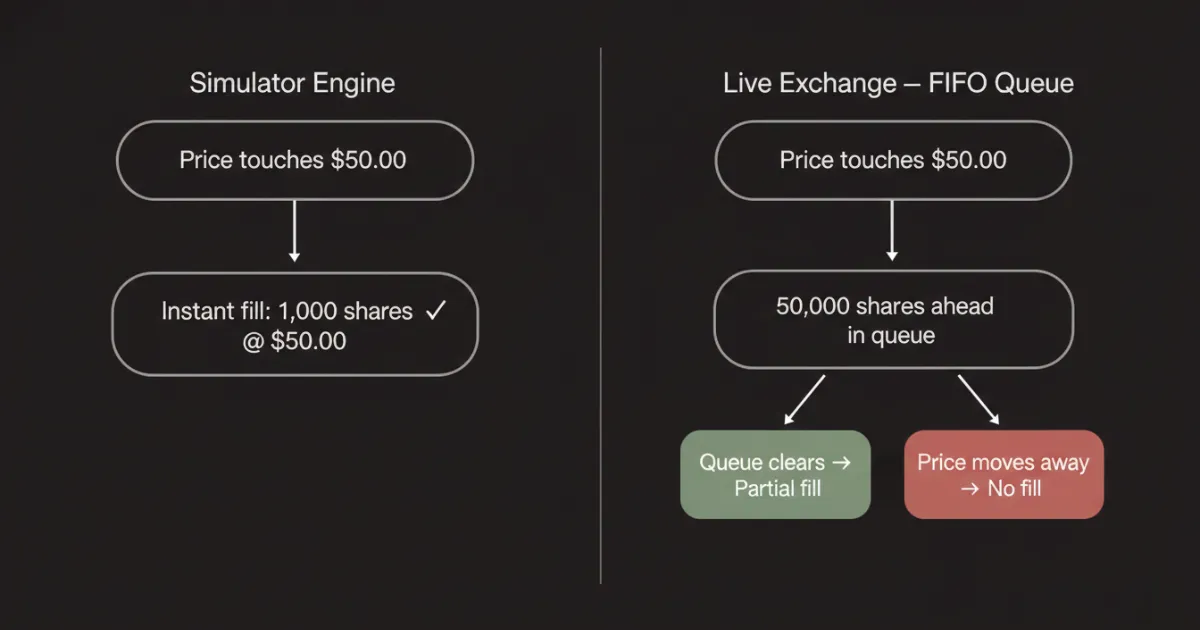
This design inflates your strategy's returns on paper. In live markets, you will watch the price touch your limit order, bounce, and leave you behind without a fill.
The Missing Friction: Market Impact, Slippage, and Latency
Slippage is the difference between the price you expect to pay and the price you get. Simulators assume perfect order fills regardless of size. If you place a market order to buy 10,000 shares of a low-volume stock, the simulator fills the entire order at the current ask.
In live trading on the NASDAQ, that 10,000-share order will sweep through multiple price levels. You will buy 500 shares at the ask, 1,000 shares at a cent higher, and the remaining balance several cents higher. Your average execution price climbs, destroying your profit margin.
Latency also changes live execution. The physical time it takes for your order to travel from your computer to your broker, and then to the exchange matching engine, introduces a delay.
While your order is in transit, other market participants can step in front of you. Simulators execute your orders on your local machine with zero transit delay, granting you a speed advantage that does not exist in reality.
Comparison Matrix: Best Day Trading Simulators at a Glance
The table below breaks down the top day trading simulators based on execution realism, cost, and data configurations. Tradicted sits in the last row as a reference point rather than a ranked entry, for the reasons covered further down.
| Platform | Cost | Real-Time Data Fee | Virtual Capital Flexibility | Execution Realism | Best For |
|---|---|---|---|---|---|
| thinkorswim | Free | Free (requires live account funding) | Adjustable ($10k - $100k+) | Moderate (simple fill rules) | Technical analysis & charting |
| IBKR Paper | Free | Paid (requires live data subscriptions) | Preset ($1,000,000 default) | High (routes simulated orders) | Multi-asset execution practice |
| TradingView | Free | Paid (subscription required for real-time) | Fully adjustable | Low (fills on tick touch) | Strategy backtesting & visual trades |
| Webull | Free | Free (basic US equities data) | Fully adjustable | Low (instant fills) | Mobile-first execution checks |
| NinjaTrader | Free | Paid (varies by futures data provider) | Fully adjustable | High (allows user-defined slippage) | Futures execution & order flow |
| Tradicted | Free | Included | Fixed by exercise parameters | High (focuses on speed & reaction) | Rep-based execution & risk drilling |
In-Depth Review of the Five Broker Simulators
Choosing a platform depends on your target market and trading style. If you plan to trade stocks, you will need different tools than a futures trader.
Before evaluating individual platforms, you can cross-reference our list of the best stock market simulators to compare general options.
1. Charles Schwab (thinkorswim paperMoney)
The thinkorswim paperMoney simulator is a desktop platform built for retail technical analysts. It offers two separate virtual accounts: a margin account and an IRA account, each pre-funded with $100,000 in virtual capital. If you need an options trading simulator, thinkorswim handles complex multi-leg options strategies, though data latency remains a major hurdle.
The main drawback for new users is data latency. The Charles Schwab (2024) platform defaults to a 20-minute data delay for paperMoney accounts.
To get real-time data, you must open a live brokerage account and fund it. Without real-time data, practicing intraday scalping or fast-paced momentum setups is impossible. The charts will show historical prints while the market has already moved on.
The execution engine is moderate. It fills orders quickly on tick touch, which does not reflect the queue dynamics of the live NASDAQ or NYSE order books.
2. Interactive Brokers (IBKR Paper Trading)
Interactive Brokers provides a paper trading account that mirrors its Trader Workstation platform. The simulator pre-funds you with $1,000,000 in virtual equity.
This platform prioritizes institutional-style execution, but it has strict functional limits. According to Interactive Brokers (2023), the paper trading account does not support specialized routing algorithms like VWAP, Auction, Request for Quote (RFQ), or Pegged to Market order types. Penny options trading is disabled in the simulator.
The interface is complex and presents a steep learning curve. The simulated matching engine is more rigorous than retail alternatives, but it requires active market data subscriptions to feed real-time pricing into the workstation.
If you do not pay for live data feeds, your simulator will use delayed data, rendering intraday testing ineffective.
3. TradingView (Paper Trading)
TradingView offers a clean, browser-based simulation interface. It integrates with your active charts, letting you buy and sell directly from the visual interface.
You can customize your virtual balance to any dollar amount, which makes it easy to set up realistic trading scenarios. The simulation engine cuts corners. It executes market orders at the current chart tick, ignoring routing delays or spread costs.
To use TradingView for live intraday practice, you must purchase a paid subscription to access real-time exchange data feeds.
Without this upgrade, you are practicing on delayed bars. This makes the platform excellent for testing general chart patterns but poor for learning execution discipline.
4. Webull (Paper Trading)
Webull provides a mobile-first paper trading app designed for accessibility. It includes a basic interface with real-time data for US equities, making it a common choice for beginners.
The platform relies on gamified features to drive user engagement. It runs regular paper trading competitions with leaderboard rankings and cash prizes. This structure can lead to bad trading habits.
To win these competitions, users often take massive, unrealistic positions that would blow up a real account within days.
The simulated engine is basic. Every market order fills at the quoted price with zero slippage, which sets your expectations well above what a live account delivers.
5. NinjaTrader (Simulation Mode)
NinjaTrader is a specialized platform built for futures and equities trading. Its simulation mode reproduces order flow and level 2 mechanics closer than the retail alternatives.
The platform allows you to configure manual slippage parameters and execution latency delays inside the settings. You can program the software to slide your fills by 1 or 2 ticks to mimic real-market friction.
The downside is the cost of setup. You must establish a connection to a live data provider, which typically requires a monthly subscription fee.
The software interface is designed for professional traders, requiring significant time to configure before you can take your first practice trade.
A Different Category: Rep-Based Practice Instead of Broker Emulation
The five platforms above solve one problem: giving you a brokerage interface without the capital risk. Tradicted, which I build, solves a different one, so ranking it against them would compare tools built for separate jobs.
I built it closer to a flight simulator than a brokerage account. You get a real candlestick chart frozen at a point in time, you pick your position and size, and the chart plays forward. There is no infinite chart to hunt setups on.
The browser version runs without an account. The Tradicted day trading simulator streams candles in real time and lets you stack up to five positions in either direction, then flatten the whole book at one price. The turn-based version hands you one candle at a time if you want to slow the repetitions down.
The mobile app adds Classic Mode at your own pace and Lightning Mode with indicators. Both track streaks. Classic counts consecutive winning trades. Lightning counts consecutive days you finish a session, and missing a day resets the count.
Webull's contests reward trade volume. The Tradicted leaderboard ranks on cumulative P&L across completed sessions, so grinding out 200 trades in a session works against you.
The tool skips order routing and platform mechanics. It runs on historical data. The repetitions build pattern recognition and decision speed, not brokerage fluency. If you need to learn where the buttons are on a live platform, use one of the five above. If you need 200 reps of reading a chart under time pressure, that is the gap this fills.
How to Apply Deliberate Practice to a Paper Trading Simulator
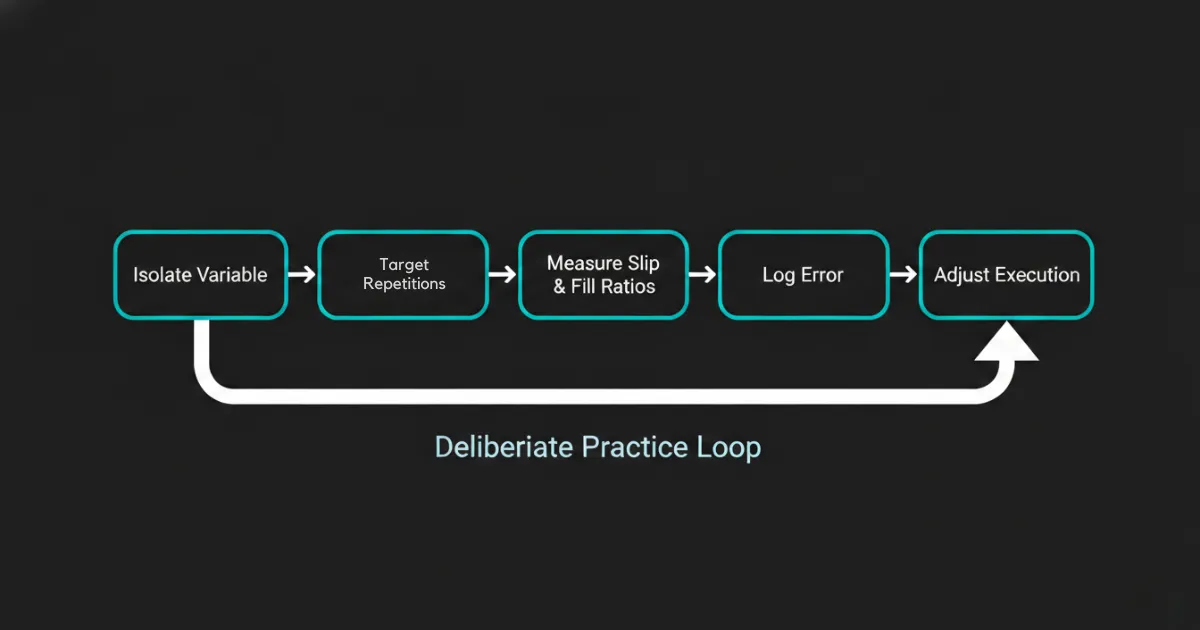
Applying deliberate practice to a paper trading simulator means isolating specific execution variables, setting measurable repetition targets, and analyzing the resulting metrics instead of clicking buttons on an active chart.
Most retail traders open a simulator and trade as if they were using real money, hunting for profits without a plan. That is entertainment with a chart attached.
In his landmark study on skill acquisition, K. Anders Ericsson (1993) demonstrated that expert performance is developed through structured repetitions, immediate feedback loops, and focused practice on isolated sub-tasks.
Clocking hours on a simulator does not make you a professional. You must design your practice sessions to build specific, repeatable habits.
Defining Specific Trading Sub-Tasks
To build skill, you must stop trying to trade the whole market. Pick one specific, narrow task and practice it until your reaction is automatic.
For example, do not spend your session looking for any stock that moves. Instead, practice one setup, such as a VWAP pullback. You can find structural setups to practice in our guide on day trading strategies for beginners.
Your practice session should look like this:
- Identify a stock pull back to the VWAP line on the 5-minute chart.
- Calculate your position size to risk exactly $50 based on the distance to your stop-loss.
- Place the limit order and the automated stop-loss within 5 seconds.
- Log the execution quality and repeat.
Let's plug in a worked formula for this position-sizing task. If your planned live starting balance is $2,000, risking 1% ($20) per trade, and your stop-loss on a stock is $0.10 away, your position size is calculated as:
Position Size = Account Risk ÷ Stop-Loss Distance = $20 ÷ $0.10 = 200 shares
If you execute this trade on a default $100,000 paper trading account, you might naturally size up to 2,000 shares (risking $200) without realizing you have scaled past your actual risk tolerance.
Do this task 50 times. Do not worry about your total daily virtual P&L. Track the accuracy of your execution and the speed of your size calculations.
Logging and Reviewing Execution Data (Feedback Loops)
Deliberate practice requires an immediate feedback loop. At the end of every trading session, you must export your trade logs and analyze your metrics.
Keep a detailed record of these data points:
- Plan Compliance: Did you enter and exit exactly where your rules dictated?
- Slippage Cost: What was the difference between your target entry price and your actual fill price?
- R-Multiple Outcomes: Did your average winning trades yield at least 1.5 times the size of your average losing trades (1.5R)?
If your manual entries keep landing late, your practice task for the next day is entry speed and nothing else. Isolate one error at a time and it stops repeating.
How to Transition from Paper Trading to Live Markets
Transitioning from paper trading to live markets requires aligning your virtual environment with real financial constraints, manually pricing in execution friction, and scaling up with micro-sized real capital.
The transition phase is where most retail accounts blow up. The mathematical reality of active trading is harsh.
Barber and Odean (2000) analyzed over 66,000 retail trading households and found that the most active traders trailed the broader market once trading costs came out. This underperformance is driven by high transaction costs and overconfidence built up in risk-free environments.
The Capital Reset: Aligning Virtual Balances with Reality
Most simulators pre-fund your virtual account with $100,000 or $1,000,000. This is a trap. If your actual starting capital is $2,000, practicing with a six-figure balance destroys your risk perception.
On a $100,000 paper account, a $500 loss feels insignificant. On a real $2,000 cash account, that same $500 loss represents 25% of your total capital. You will freeze, break your rules, and blow up your account.
Before you take your first simulated trade, reset your virtual balance to match your actual starting capital. If you plan to deposit $2,500 into a live account, configure your simulator to exactly $2,500. Calculate your risk parameters based on this realistic number.
Most platforms bury that reset in an account settings menu, so find it before the first trade.
Account Customization: Simulating Slippage and Fees Manually
To make your paper trading results realistic, you must manually add the friction of live markets to your results. Since simulated matching engines are too generous, you have to penalize your virtual fills.
Apply these manual adjustments to your simulator tracking:
- Market Orders: Add $0.01 to $0.02 of slippage per share to your buy orders, and subtract $0.01 to $0.02 from your sell orders.
- Limit Orders: Assume that 30% of your limit orders that only touch your price without passing through it would not be filled in a live queue.
- Transaction Costs: Deduct simulated broker commissions, SEC fees, and FINRA regulatory fees from your daily net profits.
If your strategy is still profitable after applying these penalties, you have a setup that can survive live market execution.
The Psychological Gap: Managing Risk When Real Money is on the Line
When you move to live markets, your brain processes risk differently. On a simulator, you can watch a trade go $300 into the red without a flinch. When the money is real, your heart rate spikes, your palms sweat, and your cognitive processing narrows.
This shift can trigger immediate behavioral failures. You might cut your winners early out of fear, or hold onto your losers hoping they break even. To understand the root causes of these errors, review our analysis on why beginners lose money.
To bridge this psychological gap, use the structured transition checklist below.
- Reset your virtual simulator account to match your planned live capital.
- Log 100 simulated trades using a single, isolated setup.
- Maintain a positive expectancy after subtracting manual slippage penalties.
- Open your live brokerage account and fund it.
- Trade at "Micro-Size" using 10-share positions for 2 weeks to test execution routes.
- Gradually increase your position size only if your rule compliance remains at 100%.
Your live account performance rides on how you manage this scaling phase. Keep your size small, accept that slippage is a cost of doing business, and treat your real capital with the same mechanical discipline you practiced on the simulator.
Your account closes Friday at 4:00 PM EST whether you took the lesson or not.