TradingView paper trading is free in 2026 for every TradingView user, on the free Basic plan too. TradingView's Help Center calls it "a completely risk-free simulator with no fees or catches" and asks for no deposit. Paper trading means trading with virtual money instead of real money. On TradingView it works as a practice broker you connect inside Supercharts, the main chart screen. The paid plans add charts, indicators and alerts. None of them unlocks a paper trading feature.
The harder part for a beginner is everything around the first trade: a list of brokers, an order panel, preset leverage (buying power beyond your cash) and a margin check, which refuses any order that needs more collateral than your account has free. When paper trading seems not to work, those settings are the first place to look.
How do you start paper trading on TradingView?
You start TradingView paper trading from Supercharts by picking Paper Trading from the list of brokers and clicking Connect. TradingView's Help Center gives these steps, with two ways to reach that list in step 2:
- Open Supercharts.
- Open the Trading panel at the bottom of the screen or click the Trade button in the top-right corner.
- Select Paper Trading from the brokers shown.
- Click Connect.
The list shows the real brokers available in your region next to Paper Trading. TradingView's own trading guide suggests starting with Paper Trading. To leave, open the trading menu at the top right of the Trading panel and click "Log out Paper Trading".
The Paper Trading account is what people mean by a TradingView demo account. TradingView lists other demo tools next to it: Bar Replay, strategy backtest reports and The Leap, a paper trading competition with a public leaderboard that typically runs about two weeks.
Is TradingView paper trading free?
Yes, TradingView paper trading is free on every plan, Basic included. The Help Center says "Paper Trading is available globally for all users" and describes it as practice "with no deposits and no real money involved".
What TradingView's paid plans sell is charting and data. Essential, Plus, Premium and Ultimate raise the Basic plan's limits. Every paid plan also removes the ads.
| Limit | Basic (free) | Essential | Plus | Premium | Ultimate |
|---|---|---|---|---|---|
| Charts per tab | 1 | 2 | 4 | 8 | 16 |
| Indicators per chart | 2 | 5 | 10 | 25 | 50 |
| Active price alerts | 3 | 20 | 100 | 400 | 1,000 |
| Historical bars | 5K | 10K | 10K | 20K | 40K |
Another limit on a free account is US stock data. On TradingView's market data page, the delay on free US stock quotes depends on each exchange's rules. NASDAQ stocks come with limited real-time data via Cboe One.
Full real-time data costs extra. The US Stock Markets bundle, which includes NYSE, NASDAQ, NYSE Arca and OTC, is $9.95 a month for a non-professional. NASDAQ alone is $3.00 a month. You can only add this data on a paid TradingView plan or during a trial.
The Basic limits cap your charting more than your practice. One chart with two indicators is enough to place and manage a paper trade.
What can you trade on TradingView paper trading?
You can paper trade almost every asset class on TradingView: stocks, forex (one currency against another), crypto, commodity futures and index futures. Futures are contracts to buy or sell something at a set price on a later date. Index futures are futures on a stock market index such as the S&P 500.
A few symbols show a non-tradable notice instead:
- Indices such as NASDAQ:NDX, because an index itself is generally not tradable. Trade an instrument that tracks the index instead.
- Synthetic symbols that TradingView calculates itself, marked with a purple label.
- Symbols on Indian exchanges, because the NSE data policy bars its market data from virtual trading.
The paper account runs in US dollars by default. On a default account TradingView converts each profit or loss from the symbol's currency into USD.
How do orders and fills work in TradingView paper trading?
You place a TradingView paper order in the order panel. You choose the side (buy or sell), the quantity, the order type and the price levels.
The order types are market, limit and stop. A limit order is an order that waits for a price you set. A stop order is an order that turns into a trade once the price reaches a level you set. You can attach a stop loss to close a losing trade at a price you choose and a take profit to close a winning trade at a price you choose.
You can also place, drag and close orders straight on the chart. The depth of market window is another way in: it lists the waiting buy and sell orders at each price. TradingView calls the execution "identical to real trading, except you can train without any financial risk."
A paper fill (the price an order actually trades at) comes from the bid and ask, the best prices buyers offer and sellers ask. In most cases buy orders fill at the ask and sell orders at the bid. The last price on the chart does not count.
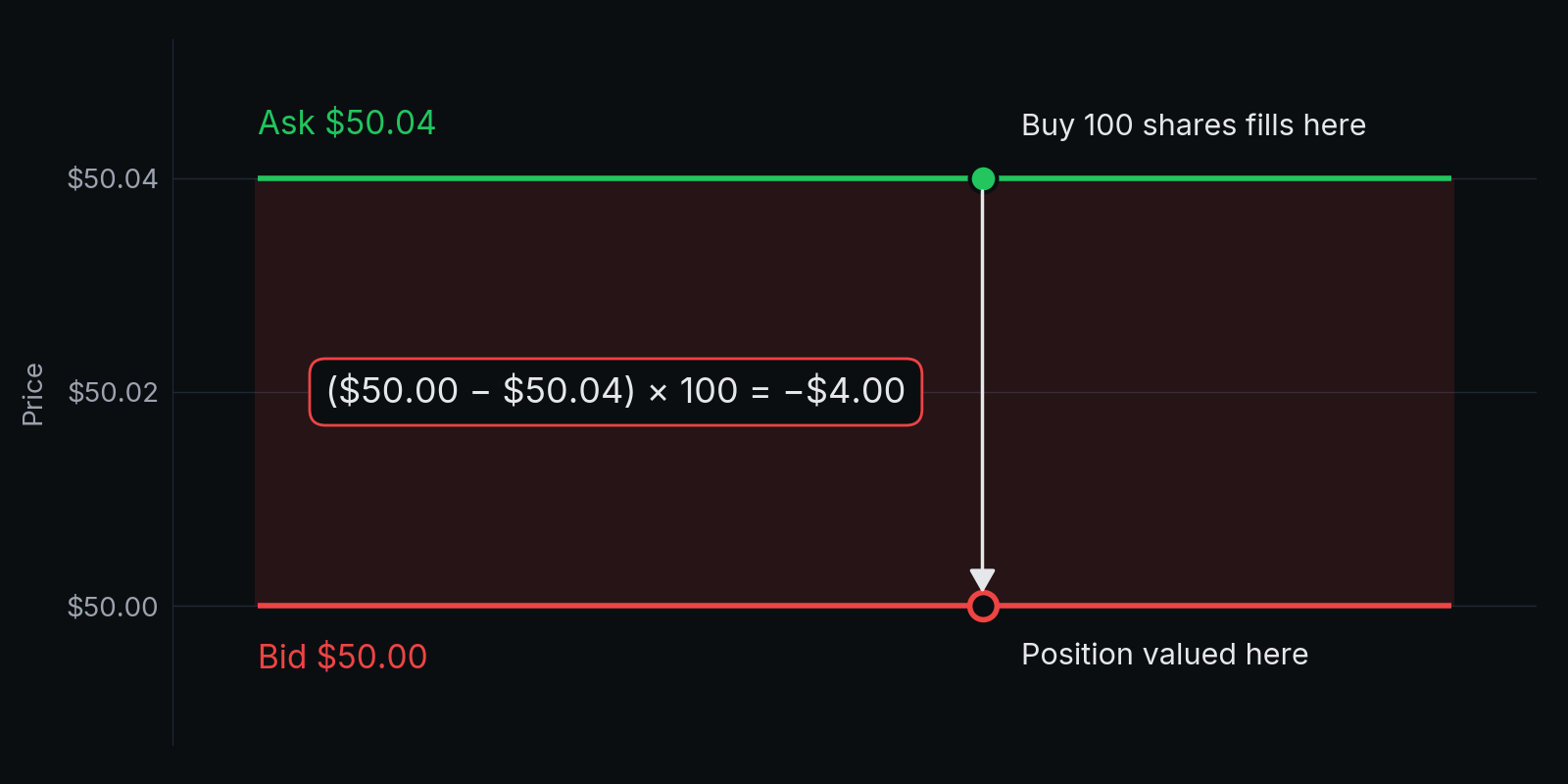
Here is what that does to a new trade, with numbers picked for the example. The bid is $50.00, the ask is $50.04 and you buy 100 shares.
Your buy fills at the ask, $50.04. TradingView values an open buy at the bid, so the profit or loss (P&L) is ($50.00 − $50.04) × 100 = −$4.00.
The trade shows a $4 loss the moment it opens. The bid has to rise above $50.04 before the position shows a profit.
Commissions are off by default, so paper results leave out a cost a real account can carry. You can switch them on in the account settings: a fee per contract for futures and options (contracts tied to a stock's price) or a fixed or percentage fee for everything else. TradingView's example is $1.25 per contract on 3 E-mini S&P 500 futures contracts, which comes to $3.75. TradingView charges it when the position opens and again when it closes.
Why does TradingView paper trading refuse an order for not enough funds?
TradingView refuses a paper order for lack of funds when the margin the position needs is larger than the margin still available in your account. Margin is the cash a broker holds as collateral. TradingView paper accounts come with leverage (buying power beyond your cash) preset per asset class at values "commonly used by real brokers and exchanges". Every order passes that margin check before it executes.
TradingView's own example is E-mini S&P 500 futures. Their default margin requirement is 5%, which equals 20x leverage, because 1 ÷ 0.05 = 20.
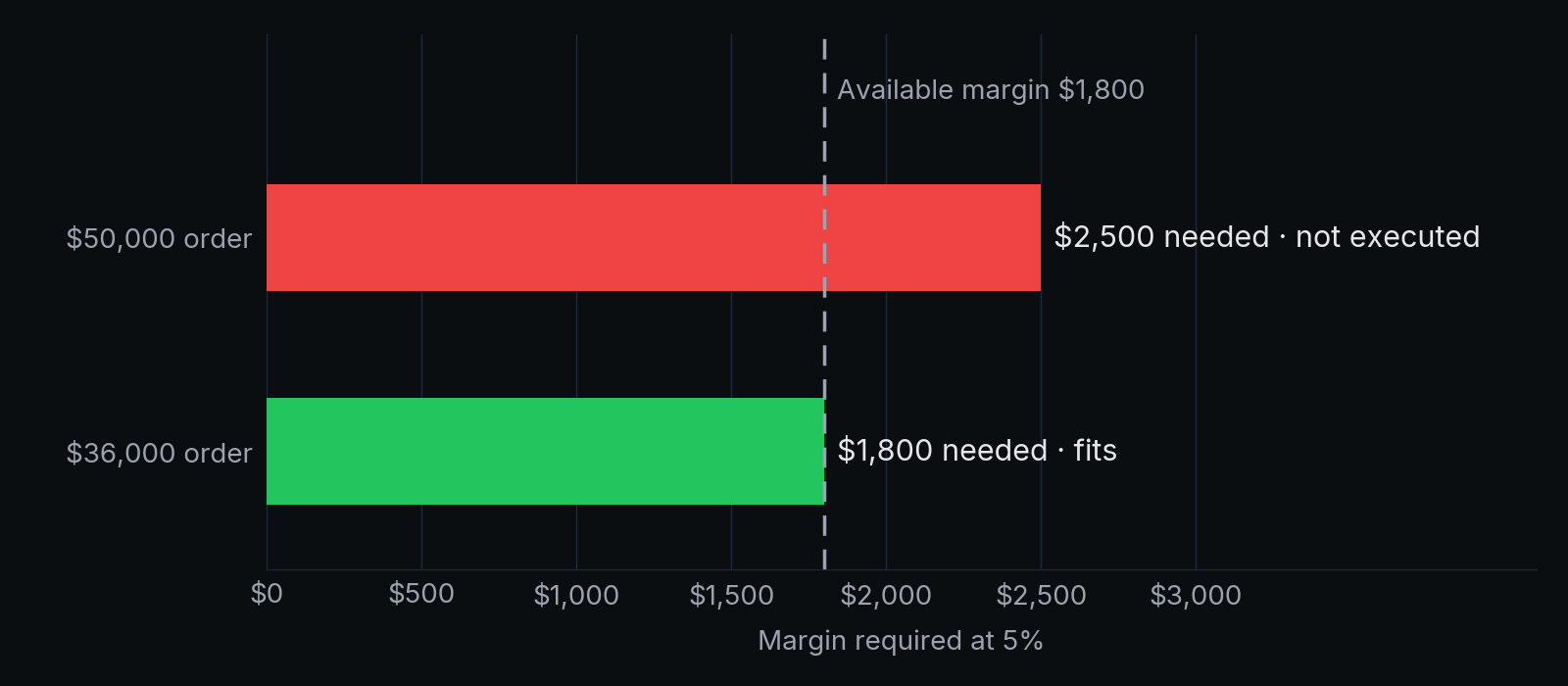
Now a hypothetical order. Your open positions already hold most of the account as collateral, so $1,800 of available margin is left.
You send an order for a $50,000 position on an asset with a 5% margin requirement. The required margin is $50,000 × 0.05 = $2,500.
The order needs $2,500 and you have $1,800, so TradingView does not execute it. The largest position that fits is $1,800 ÷ 0.05 = $36,000.
The order panel shows the trade value, the available margin and the tick value (what one smallest price step is worth) before you send an order. The collateral your open positions hold shows as Account margin in the Account Manager tab at the bottom of Supercharts.
The first fix is a smaller order. The second is closing or shrinking an open position to free its collateral. The third is changing the leverage for that asset class in the account settings, which TradingView allows at any time. A new leverage setting applies to every order in that paper account.
Sizing an order to fit a margin limit is a separate question from how much to risk on it. The position size calculator works out a share count from your stop distance. The lesson on how much to risk per trade covers the percentage.
Why is my TradingView paper order not working?
A TradingView paper order that does not go through may have hit one of the platform's own rules, with nothing broken. These are the causes TradingView's Help Center describes:
| What you see | Cause | Fix |
|---|---|---|
| Order refused for funds | Required margin is larger than available margin | Smaller order, close a position or change the leverage |
| Order vanished | Day orders cancel after 24 hours unfilled | Choose Week, Month or GTD (good till a date you pick) |
| Second order did not open a new trade | Only one position per symbol; new orders merge into it | Close the first position before opening a fresh one |
| Symbol cannot be traded | Index, synthetic symbol or Indian exchange | Pick a tradable symbol, such as an instrument that tracks the index |
| Limit order did not fill before the open or after the close | "Fill order outside RTH" was not ticked | Tick it in the order panel |
| New trade shows a loss straight away | Buys fill at the ask and are valued at the bid | Nothing: that gap is the spread |
Day is the default time in force, so an order that stays unfilled is canceled after 24 hours. TradingView offers no Good 'Til Canceled orders in paper trading, "to prevent the stacking of orders that would never be executed".
The extended hours rule covers stocks, ETFs (exchange-traded funds, baskets of stocks that trade like one stock), bonds and depositary receipts. For US stocks, extended hours means trading before 9:30 AM or after 4:00 PM ET. RTH stands for regular trading hours.
How do you reset a TradingView paper trading account?
Resetting a TradingView paper account deletes its transaction history, active orders and open positions. TradingView then asks you to choose a currency. The default currency is USD.
You can also keep several paper accounts (TradingView calls them sub-accounts), each in its own currency. You switch between them in the Trading panel. A second account lets you start fresh while the first one keeps its history. Write down any trade you want to review before you reset, because the reset wipes it.
Where does TradingView paper trading confuse beginners?
TradingView paper trading is the full trading platform with a simulated broker plugged in. Before your first trade you pick a broker from a list, fill in an order panel and live with leverage presets and a margin check.
Then you wait. The trade only moves as fast as the live price, so a session holds few buy or sell decisions.
That friction is also what TradingView paper trading is good for. If you want to practice order types, bid and ask fills and managing a position on live prices, TradingView gives you its full order panel at no cost. If you want to practice the decision itself, whether a chart says buy or sell, a simpler tool puts more of those decisions in front of you.
What is a simpler TradingView alternative for practice?
The simpler TradingView alternative is a tool that skips the broker setup: Tradicted, a free stock market simulator and paper trading app with virtual money and no sign-up, on iOS and Android and in your browser on tradicted.com. A broker paper account is the other route, if you want the order screens you would later fund.
| Tool | Cost | Sign-up | Real tickers | What you practice |
|---|---|---|---|---|
| Tradicted app | Free, no ads | None, account optional | No ticker and no date | Buy or sell decisions on candlestick charts from real market data |
| Tradicted day trading simulator | Free, in the browser | None | No ticker | Trading a moving chart with up to five positions |
| TradingView Paper Trading | Free on every plan | No deposit; switched on in Supercharts | Yes, live market conditions | Order types, bid and ask fills, margin and leverage |
| thinkorswim paperMoney | Free to Schwab clients | Schwab account or a 30-day Guest Pass | Yes, real-time market data | thinkorswim's order screens with $100,000 of virtual buying power |
| Interactive Brokers paper account | - | Funded live IBKR account | Yes; some paper accounts use delayed data | Margin, leverage and maintenance margin as on a live account |
Tradicted
Tradicted is my app. In Classic mode the candlestick chart stops at a point with no ticker and no date (each candle is one bar showing the price over one stretch of time). You set a stake from $0 to $5,000 in steps of $1,000, tap BUY or SELL and the chart plays forward to show the answer. The practice balance is $100,000 and you can reset it any time in Settings.
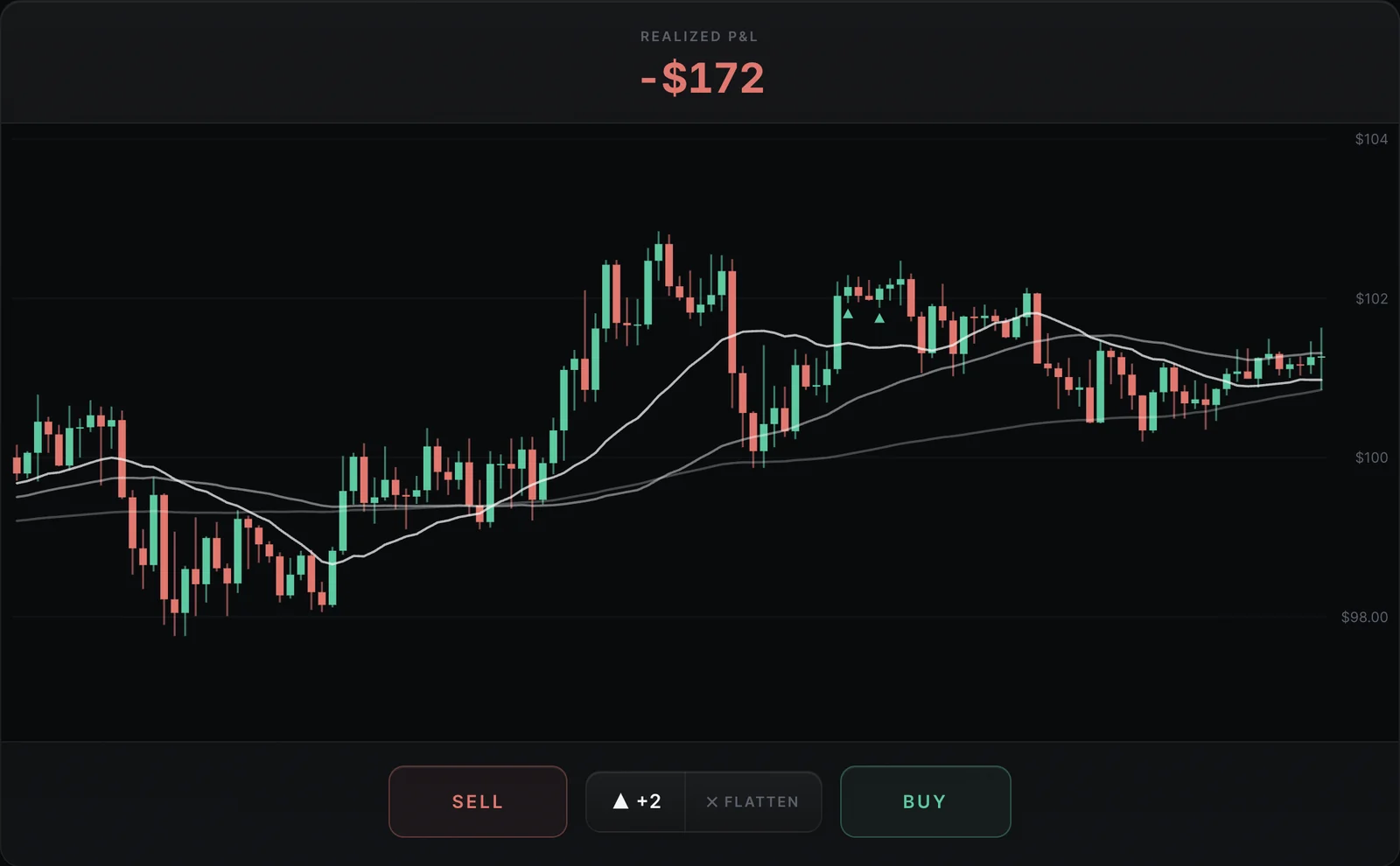
Lightning mode plays the chart forward candle by candle while you trade it, up to five lots (units of a trade) in either direction, with Stop Loss and Take Profit lines. In the browser, the day trading simulator lets you trade a moving chart, flatten (close every open position at once) in one click and see your max drawdown, the biggest drop from your peak. The fake trading simulator asks you to decide the direction of fifteen candles and shows your accuracy at the end. If candlesticks are new to you, the lesson on how to read candlesticks comes first.
Tradicted's weakness is everything TradingView does well. There is no live feed, no ticker and no limit or stop order entry, so order mechanics stay on TradingView or a broker. Trades also cost energy, points from an in-app bar that refills over time: 2 per staked Classic trade and 20 per Lightning run, with 1 point back every 9 minutes up to 100.
Broker paper accounts
thinkorswim paperMoney is free to Schwab clients and gives you $100,000 of virtual buying power on real-time market data, inside the same thinkorswim platform you would trade on. A Schwab account is required to log in. Without one, a thinkorswim Guest Pass gives 30 days that cannot be extended. Your account data and settings are no longer accessible once the pass ends.
An Interactive Brokers paper account is for clients only. Interactive Brokers notes that paper fills can be more favorable than live ones and that some paper accounts use delayed market data. Opening the paper account waits until your live account is funded. A request by 4:00 PM ET on a business day is processed by the next business day. The paper account simulates most of a live account, margin and leverage included.
Webull's paper trading covers stocks, ETFs, options, crypto and futures on the mobile app, desktop app and web, with orange order buttons that set paper orders apart from real ones. You reset it from the account menu.
For more tools side by side, see the best paper trading apps, the best stock trading simulators and the best day trading simulators.